
User Switching Addon for Luxa Users Pro
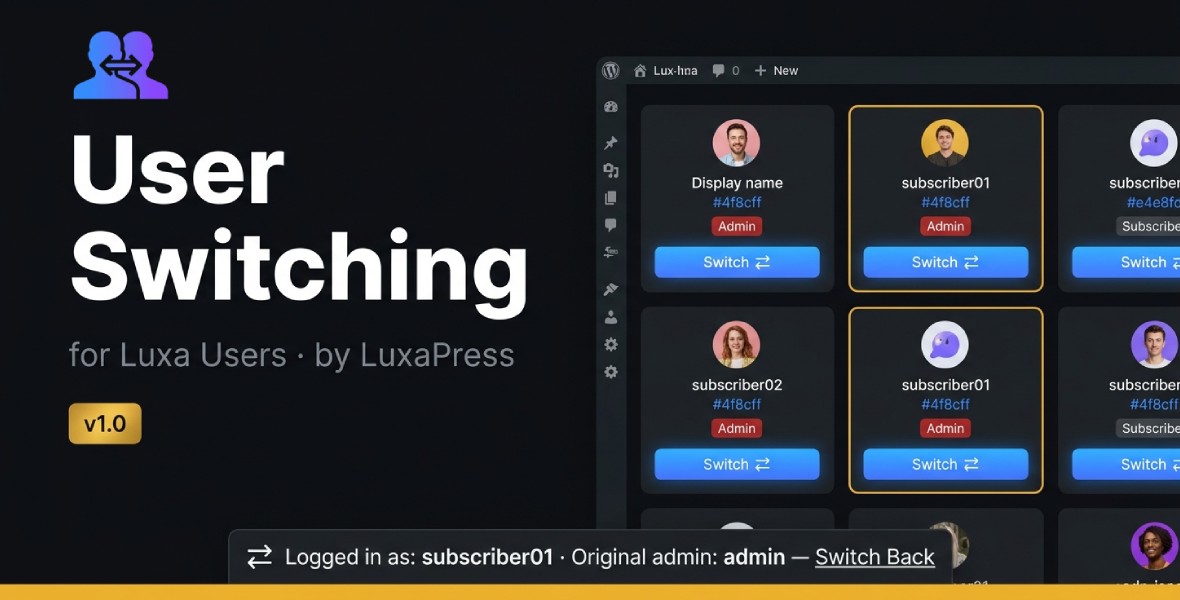
Switch into any WordPress user account instantly.
Luxa Users – User Switching is an official add-on for Luxa Users Pro that lets administrators switch into another WordPress user’s account with one click — without knowing or requesting their password.
See exactly what your users see, troubleshoot account-specific issues, test permissions, and verify restricted content faster.
🚀 Features
One-Click User Switching
Switch directly into any user account from the User Switching page.
🔍 Search & Filter
Find users quickly by:
- Display name
- Username
- User role
Use role filters to narrow down the list and find the right account faster.
⚡ Real-Time Search
Search users instantly without unnecessary page reloads.
Press Ctrl + K to focus the search field and start searching immediately.
🔄 Switch Back Instantly
A persistent switching banner keeps your original administrator account visible while you are switched into another user.
Click Switch Back to return to your original session.
🟡 Frontend Switching Banner
The frontend banner clearly shows:
- Current user
- Original administrator
- Switch Back action
You always know which account is currently active.
📋 Switch Log
Keep a record of switching activity with:
- Date and time
- Username
- Action type
- IP address
The log stores up to 200 entries and can be cleared from the Switch Log page.
🛡️ Security by Default
User Switching uses security protections including:
- Nonce-protected switching URLs
- Administrator-only access
- Capability checks
- Nested switching protection
No user password is required.
🔐 WordPress Login Event
The add-on fires the standard wp_login event when a switch occurs, allowing compatible activity log, security, and session plugins to detect switching activity.

Luxa Users Integration
Built specifically for the Luxa Users ecosystem.
User Switching integrates with the Luxa Users admin interface, navigation, and FancySkin instead of creating a separate disconnected admin experience.
💡 Why User Switching?
Troubleshooting a user-specific problem normally requires creating test accounts, logging out, logging back in, and repeatedly switching between sessions.
With User Switching, the process is simple:
Find the user → Switch → Test → Switch Back
You can experience the website exactly as that user does without asking for their credentials.
🎯 Perfect For
- WordPress administrators
- Developers
- Freelancers
- Web agencies
- Client websites
- Membership websites
- Customer support teams
- Role and permission testing
- Troubleshooting user-specific issues
🌐 Frontend-Friendly
User Switching is designed for websites where regular users cannot access /wp-admin.
After switching, you are taken to the frontend and can browse the website using the selected user’s account.
When finished, use Switch Back to return to your original administrator session.
📦 Requirements
| Requirement | Minimum |
|---|---|
| WordPress | 6.2+ |
| PHP | 7.4+ |
| Luxa Users | 2.4+ |
| Luxa Users Pro | 1.1+ |
| Luxa Users Pro License | Required |
⚙️ Installation
- Purchase User Switching from LuxaPress.
- Download the plugin from your LuxaPress account.
- Install the ZIP file through WordPress → Plugins → Add New → Upload Plugin.
- Activate the plugin.
- Go to Settings → License → User Switching.
- Enter your LuxaPress license key.
- Activate the license.
- Open User Switching from the Luxa Users admin interface.
That’s it. No additional configuration is required for the basic switching workflow.
🔑 License & Updates
Your purchase includes a LuxaPress license key that is used to activate the plugin and receive updates.
After purchase, your license and product information are available from your LuxaPress account.
An active Luxa Users Pro license is required to use this add-on.
The User Switching add-on also requires its own active license.
🔄 Automatic Updates
Once your LuxaPress license is activated, you can receive available plugin updates directly through WordPress.
Updates may include:
- New features
- Bug fixes
- Performance improvements
- Security improvements
- WordPress compatibility updates
📚 Documentation
Detailed documentation is available for installation, activation, configuration, usage, troubleshooting, and frequently asked questions.
Documentation: https://luxapress.com/docs/user-switching
Support
Need help with User Switching?
LuxaPress provides support for:
- Installation
- License activation
- Plugin configuration
- User switching
- Switch Back
- Switch Log
- Bugs and compatibility issues
Support: https://luxapress.com/support
Changelog
Version 1.0.0
- Initial release
- One-click user switching
- User search and filtering
- Role filtering
- Real-time search
- Ctrl + K search shortcut
- Frontend switching banner
- Admin bar indicator
- Switch Back functionality
- Switch Log
wp_loginintegration- Luxa Users integration
- FancySkin integration
- Security protections
❤️ Thank You
Thank you for choosing LuxaPress.
If User Switching saves you time managing your WordPress website, we’d appreciate your feedback.
Your support helps us continue building powerful, lightweight WordPress plugins for developers, agencies, and website owners.
Luxa Users – User Switching
An official LuxaPress Add-on
Website: https://luxapress.com