
Luxa Users Pro

Luxa Users — Modern Login, Registration & Profile Forms for WordPress Replace wp-login.php with clean, shortcode-based forms — extend with Two-Factor Auth, Social Login, and a drag-and-drop Custom Fields Builder.
Beautiful login, register & profile pages via shortcode — with optional 2FA, Social Login, and Custom Fields add-ons.
Intro
Luxa Users replaces WordPress’s default wp-login.php with clean, fully-customizable Login, Register, and Profile pages you build with a single shortcode. No page builder wrestling, no theme conflicts — drop in [lxu_login], [lxu_register], or [lxu_profile] and you’re done.
Free to start, with a Pro upgrade that unlocks a polished admin experience and an add-on catalog — install Two-Factor Authentication, Social Login (Google/Facebook/GitHub), or a full drag-and-drop Custom Fields Builder directly from your WordPress dashboard, no manual uploads required.
[SCREENSHOT: Login form + Register form side by side, front-end, clean theme]
Key Features
Core (included free)
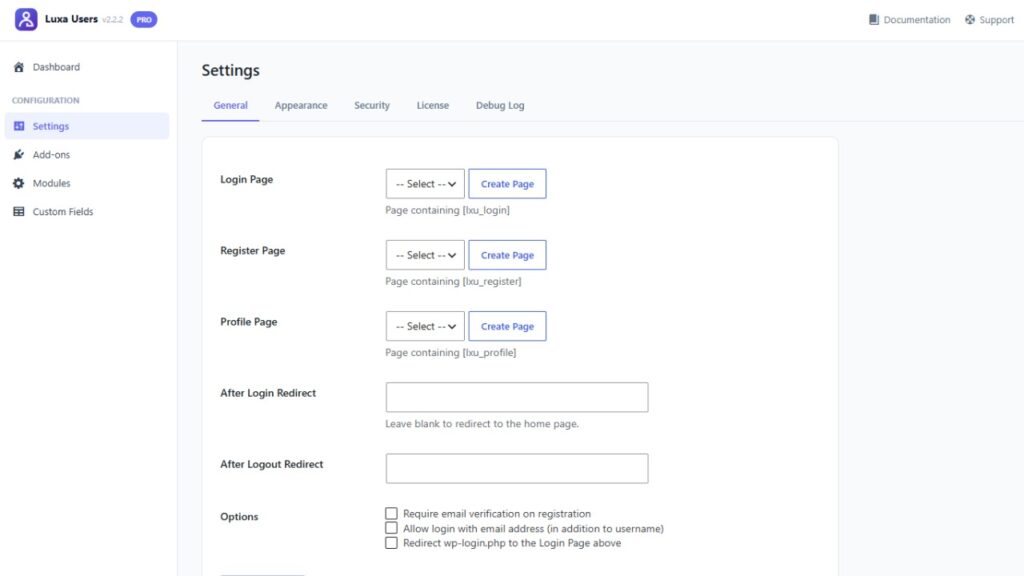
[lxu_login],[lxu_register],[lxu_forgot_password],[lxu_profile]shortcodes — drop into any page or post- One-click Create Page button — generates the page and inserts the shortcode automatically, no copy-pasting
- Optional full wp-login.php redirect — send visitors to your own branded pages instead of WordPress’s default screen, with safe fallback logic that never breaks logout, password-protected posts, or password-reset emails
- Email verification, login-with-email, configurable login-attempt lockout (brute-force protection)
- Fully theme-independent — works with any theme, or disable the bundled CSS entirely to style it yourself
- Editable transactional emails (welcome, verification, password reset)
- Built-in activity log for troubleshooting
Pro upgrade
- Polished, modern admin dashboard (color themes included) replacing the plain default WordPress admin look
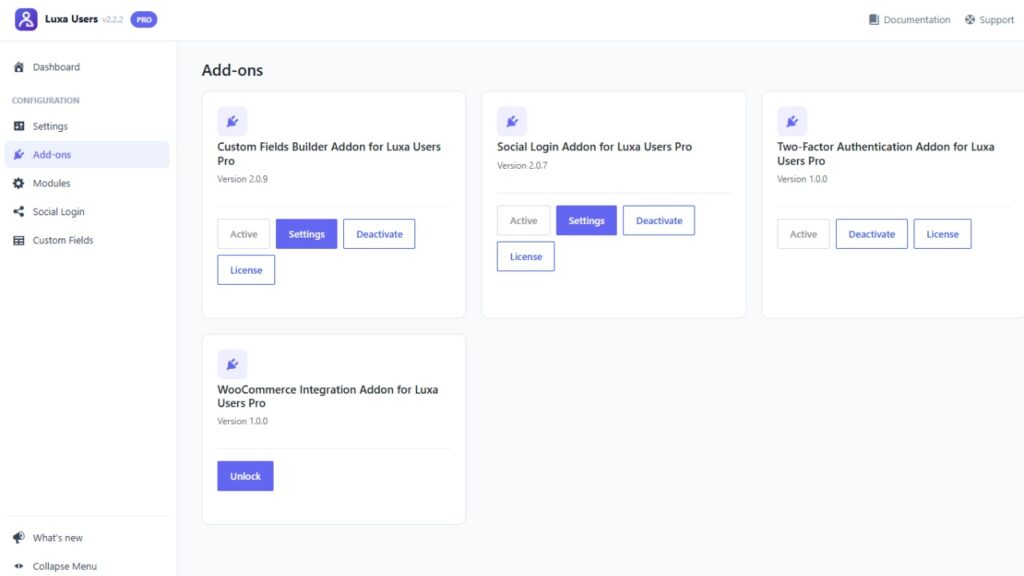
- Modules — optional bundled features you switch on/off with one click (starting with Mobile Number Login)
- Add-ons screen — browse, unlock, install, activate, and manage every official add-on without leaving wp-admin
- Centralized License management — every add-on’s license lives on one screen, with its own tab
Official Add-ons
🔐 Two-Factor Authentication
Require a 6-digit authenticator-app code (Google Authenticator, Authy, 1Password — standard TOTP, RFC 6238) at login, with one-time backup codes for lost devices. The secret is generated and verified entirely on your own server and encrypted at rest — nothing is ever sent to a third-party service.
🌐 Social Login
Let visitors sign in with Google, Facebook, or GitHub — buttons appear automatically on your login/register pages once a provider is configured. Matching accounts are linked automatically by email, never duplicated.
📝 Custom Fields Builder
A drag-and-drop field builder for Register and Profile — 14 field types (Text, Number, Dropdown, File Upload, Repeater, and more), each fully configurable, no code required. Field data saves as standard WordPress user meta.
[SCREENSHOT: Custom Fields Builder — drag-and-drop palette + field settings panel]
[SCREENSHOT: Social Login provider buttons on a live login form]
[SCREENSHOT: 2FA setup screen — QR code + backup codes]
Free vs. Pro vs. Add-ons
| Free | Pro | Add-ons | |
|---|---|---|---|
| Login / Register / Profile shortcodes | ✅ | ✅ | — |
| Create Page button | ✅ | ✅ | — |
| wp-login.php redirect | ✅ | ✅ | — |
| Email verification & login lockout | ✅ | ✅ | — |
| Polished admin dashboard | — | ✅ | — |
| Modules (e.g. Mobile Number Login) | — | ✅ | — |
| Install add-ons from wp-admin | — | ✅ | — |
| Two-Factor Authentication | — | (required) | ✅ |
| Social Login (Google/Facebook/GitHub) | — | (required) | ✅ |
| Custom Fields Builder | — | (required) | ✅ |
Every add-on requires an active Luxa Users Pro license underneath it — Pro is the platform add-ons install into.
Why Luxa Users
- Real shortcodes, not a page builder plugin — works inside any page builder, any theme, any layout you already have.
- Extensible by design — every add-on hooks into documented filters/actions; nothing patches core files.
- Security taken seriously — TOTP secrets and backup codes encrypted/hashed at rest, brute-force lockout, safe wp-login.php redirect logic that never breaks WordPress’s own critical flows (logout, password-protected content, password-reset links).
- No bloat — each add-on is a separate plugin; install only what you actually need.
- Actively maintained — regular updates, changelog-documented fixes, automated test suite covering the highest-risk logic (license validation, TOTP correctness against official RFC test vectors, settings save idempotency).
Requirements
- WordPress 6.2 or newer
- PHP 7.4 or newer
- Pro and add-ons require the free Luxa Users plugin active; add-ons additionally require an active Pro license
Documentation & Support
- 📖 User Guide — everyday usage for Free, Pro, and every add-on
- ⚙️ Installation & License Setup Guide — step-by-step install + license activation
- ❓ FAQ — common questions, answered in detail
- 💬 Support via luxapress.com/support
(Replace the # links above with your published documentation URLs before submitting.)
Changelog
= 1.0.0 =
* Initial release.
Credits
This item bundles the following third-party, MIT-licensed library:
- qrcode-generator by Kazuhiko Arase — used client-side in the Two-Factor Authentication add-on to render setup QR codes. See
THIRD-PARTY-NOTICES.mdin that add-on’s files.